Prep
Boxes
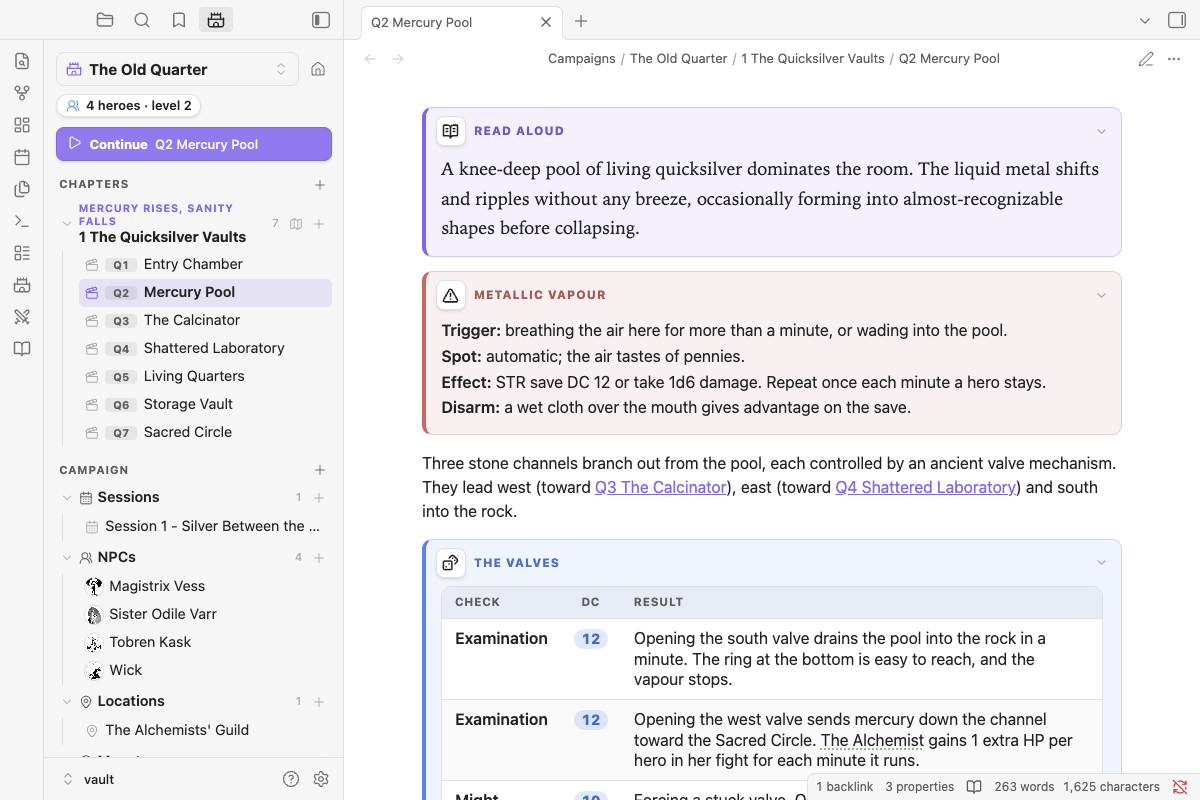
Styled boxes for adventure notes: read-aloud text, what's in a room, treasure, traps, clues, handouts and more. Type the slash command and start writing inside the box.
| Command | Box |
|---|---|
/read-aloud (/read) |
Read-aloud text, in a serif face so it's the first thing your eye finds |
/look |
What's here |
/treasure (/loot) |
Treasure and rewards |
/trap (/hazard) |
A trap or hazard, with Trigger / Spot / Effect / Disarm lines |
/secret, /clue, /checks, /exits |
GM-only notes, clues, a check table, exits |
/handout, /lore, /rumor, /quest |
A handout (old paper), lore, rumors, a quest or hook |
/box |
Any of the above, searchable |
Restyling a box: click its icon. A small panel opens with three tabs (Type, Icon, Look); the title is edited at the top. You can pick:
- a type
- a title
- an icon from the library (or any Lucide icon by name)
- a colour, or any custom colour
- a style: card, banner, old note, letter, stone or minimal
- a font: sans, serif, hand or mono
- bold, italic, or start folded
Changes preview live and are saved when you click away. Click a box's title to fold it.
Tables in boxes, and in notes (setting: Styled tables), get rounded corners, a tinted header and zebra rows. A DC column shows its numbers as pills.
The look lives on the fence line, so you can also type it:
```box treasure title="Wyrm's hoard" icon=crown color=gold style=parchment
- 300 gp in old coin
- A **+1 shield**
```