Prep
NPCs
On this page
A note is an NPC when its properties say nimble: npc, or it's tagged #npc. Add role: for a one-line description, aliases: for other names, and portrait: for their art.
---
nimble: npc
role: Master assayer of the Alchemists' Guild
aliases:
  - Master Kask
portrait: "[[Tobren Kask.png]]"
---
New NPC (the + next to NPCs in the Campaign panel, or the command palette) makes this note for you, character card included.
Character cards#
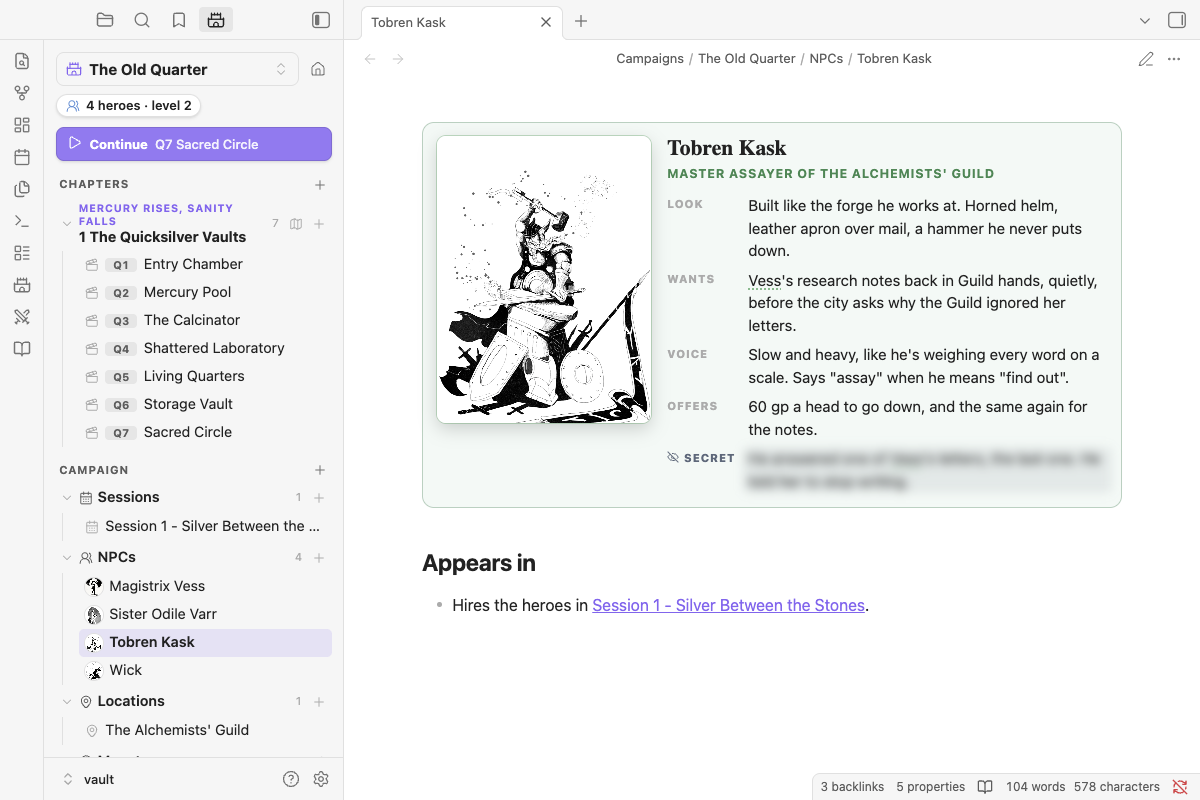
A nimble-npc block shows the NPC as a card: portrait, name, role, and a few short rows.
```nimble-npc
look: Built like the forge he works at. Horned helm, a hammer he never puts down.
wants: Vess's research notes back in Guild hands, quietly.
voice: Slow and heavy, like he's weighing every word on a scale.
secret: He answered one of Vess's letters, the last one. He told her to stop writing.
```- Rows are any
Label: textlines, so add your own (knows:,fears:,stats:). Text can be Markdown, with links, bold and lists. Lines without a label carry on the row above. - Secret rows (
secret:orgm:) are blurred until you click them, which helps when your screen is shared. - Name and role come from the note's title and
role:property. Putname:orrole:lines in the block to override them. - Type
/npc-cardto insert a card anywhere. It works in scene notes too, for a minor character who doesn't need their own page.
Portraits#
A card without a portrait shows an empty frame. Click it to:
- Upload an image… from your computer, or your photo library on a phone. It's copied into your vault, following your attachment folder setting in Settings → Files and links.
- Choose from vault… to pick an image you already have.
On desktop you can also drop an image file straight onto the frame.
Once it has a portrait:
- Click it to see it large, for a closer look or to turn the screen to your players. On desktop, Show in its own window opens it in a pop-out you can drag to a second screen.
- Hover over it and use the image button to change or remove it. You can also right-click it.
- The portrait is the NPC's icon in the Campaign panel, and it shows in hover previews of the note.
The portrait is saved in the portrait property, as a link like "[[Tobren Kask.png]]", so you can also set it by hand. It can be an https:// image URL too, although that image is then loaded from the internet. If a face gets cropped, set portrait-position: to a CSS position such as top, center 10% or 40% 30%.
Finding art: art you drew, commissioned or bought for your table is fine for your own game. Before you share a vault with someone else's art in it, check the art's license allows that, and credit the artist.
Links and mentions#
- Links become chips.
[[Tobren Kask]]shows as a green person chip, in reading view and Live Preview. Clicking a chip or a linked mention opens the NPC's note in a quick look over your page, with Open page if you want to go there; Cmd/Ctrl-click opens the page directly. - Mentions are linked as you read. The NPC's name or an alias anywhere in that campaign's notes gets a dotted underline and a hover preview. In Live Preview, Cmd/Ctrl-click opens the note. Your files aren't changed. Turn this off with Link NPC names as you read in settings.
/npcsearches the campaign's NPCs and inserts a link. Typing a new name offers New NPC, which creates the note in the campaign's NPCs folder.- Generic creatures (a cultist, a zombie) are better as bestiary references (
`nimble:Cultist`). NPCs are the named people with their own pages, and they can carry a stat block too.